Introduction: Three Decades from the Digital Front Lines
If you built for the web in the mid-1990s, your canvas was equal parts wild frontier and technical constraint. Pages were assembled using nested HTML table grids, background images had to be meticulously tiled to fit under 28.8k dial-up modems, and visual interest usually meant a <marquee> scroll or a flashing neon banner.
Fast forward thirty years. We now design for high-DPI displays, gigabit fiber connections, and pocket supercomputers executing complex client-side applications. Yet despite three decades of radical hardware and software transformation, the fundamental mandate of web design has not shifted an inch: delivering the right content to a human user as clearly and quickly as possible.
Having engineered custom web architectures through every major epoch of the commercial internet, one lesson stands out above all others: novelty is cheap, but engineering lasts. The web continuously invents visual trends that burn bright for three to five years before collapsing under their own weight. Distinguishing fleeting noise from enduring web design core fundamentals is the difference between an asset that drives long-term business value and a site burdened by template debt.
The Era of Noise: High-Profile Trends That Burned Out
Every era of the web has had its golden calf—a design trend or technology promised to revolutionize the user experience, only to end up in the digital graveyard.
Flash Animations & Splash Pages (Late 1990s – 2000s)
In the early days of vector graphics, Macromedia Flash offered complete creative freedom untethered from primitive HTML layout engines. Agencies built full-screen splash portals with custom preloaders, sound effects, and floating navigation nodes.
- Why it failed: Flash was completely invisible to search engine crawlers and screen readers. When mobile browsing arrived, Steve Jobs’ iconic 2010 Thoughts on Flash open letter highlighted its fatal flaws: high energy consumption, severe security vulnerabilities, and a total lack of touch-interface optimization.
Skeuomorphism Gone Wild (Early 2010s)
As touchscreen smartphones proliferated, interfaces began mimicking physical textures to help users bridge the cognitive gap. Real-estate sites featured stitched leather borders, calendar apps looked like physical desk blotters, and buttons sported heavy metallic bevels.
- Why it faded: Visual ornamentation added heavy graphical assets without improving utility. On smaller screens, glossy gradients and drop shadows created visual clutter that compromised content legibility. It quickly yielded to the clean, functional lines of flat and material design.
Parallax Scrolling & Scroll Hijacking (Mid-2010s)
As JavaScript libraries matured, designers began overriding native browser scrollbars to create multi-layered, interactive storytelling layouts where background elements moved at varying speeds.
- Why it backfired: “Scrolljacking” stripped users of control over their viewport, triggering severe frame rate throttling on mid-range hardware and inducing motion sickness for sensitive users. More critically, it broke basic browser navigation, bookmarking, and accessibility patterns.
Heavy Page Builders & “Everything-in-One” Themes (Late 2010s – Present)
To cater to non-technical users, commercial themes began bundling drag-and-drop visual page builders, dozens of slider plugins, and thousands of pre-configured style options into monolithic packages.
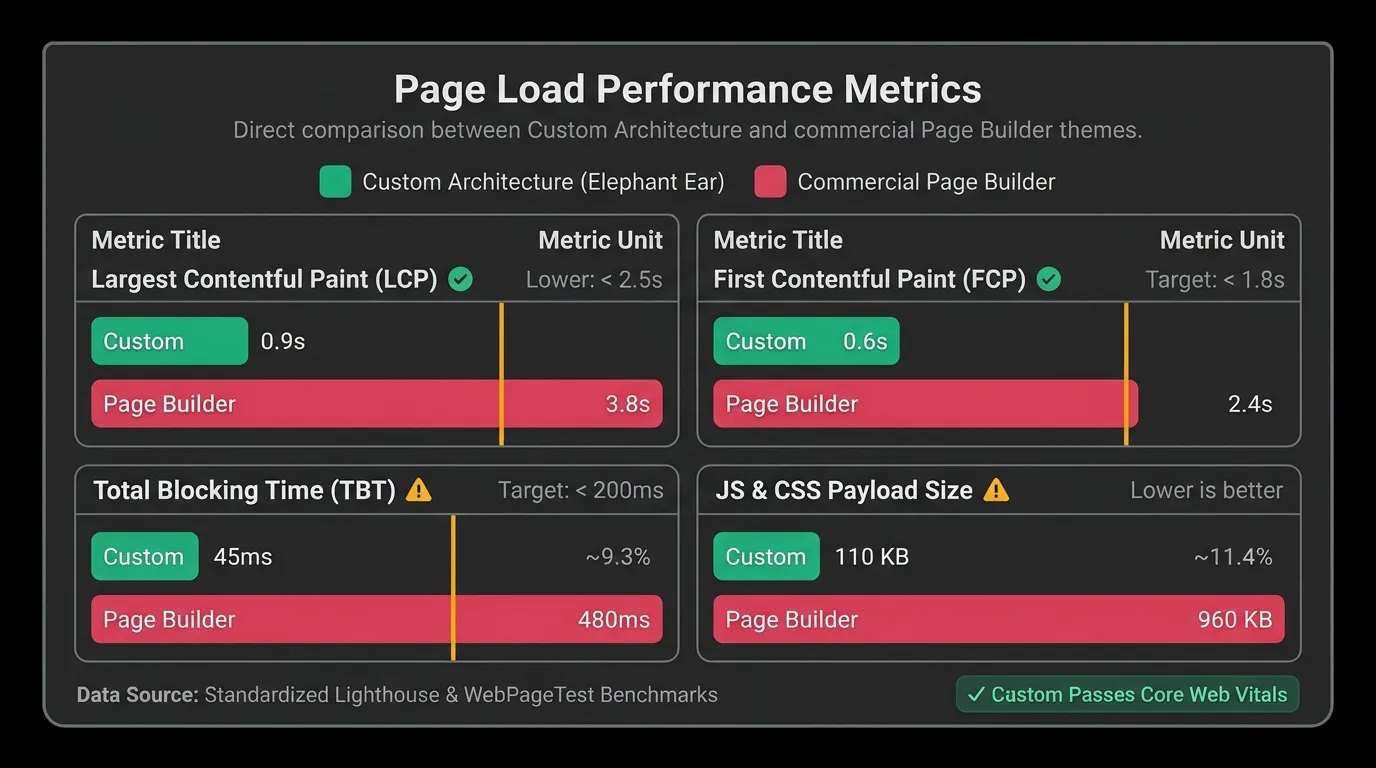
- Why it’s collapsing: These systems inject thousands of lines of unused CSS and JavaScript into every page request. The result is severe Core Web Vitals penalties, security vulnerabilities stemming from bloated plugin dependencies, and catastrophic vendor lock-in when a business attempts to migrate.
The Core Fundamentals: What Has Endured Across 30 Years
While visual trends come and go, four core principles have remained constant indicators of web quality across every device generation.
| Core Fundamental | The 1990s Baseline (Noise Era) | Toady’s Standards (Fundamentals Era) |
|---|---|---|
| A. Typography & Hierarchy | Web-safe fonts (Times New Roman, Arial), static pixel sizing, and limited leading control. |
Fluid clamp() typography, variable system fonts, strict color contrast ratios (WCAG 2.1), and dynamic line heights. |
| B. Speed & Performance | Compressing 8-bit GIFs for 28.8k dial-up; basic caching. Page loads measured in minutes. | Core Web Vitals dominance, native image formats (AVIF/WebP), zero runtime bloat, and sub-100ms response. |
| C. Semantic Structure | Nesting <table> tags for visual layout; broken HTML document structure. |
Semantic HTML5 (<main>, <article>, <nav>), clean DOM tree structure, and valid syntax. |
| D. WCAG Accessibility | Basic alt text on images (if provided); fully dependent on proprietary tech (Flash). |
Full WCAG 2.2 AA compliance, keyboard navigation, ARIA landmarks, and high-contrast styling. |
A. Typography & Content Hierarchy
Content is the sole reason a user visits a website. Clear visual hierarchy—achieved through deliberate font sizing, line height, and contrast—guides the eye effortlessly. Modern CSS allows us to implement fluid typography that scales smoothly between mobile viewports and desktop monitors without relying on bloated JavaScript libraries.
B. Speed as First-Class UX
In 1996, a 100KB page took 30 seconds to download over dial-up; today, a 5MB page builder payload over a spotty mobile network produces the exact same frustrating delay. High-performing websites have always prioritized asset optimization, script deferral, and efficient network requests. Speed is not a technical vanity metric; it directly impacts conversion rates and search rankings.
C. Clean Semantic Architecture
Web browsers and search engine crawlers rely on structured content trees to understand what a page means, not just how it looks. Using native HTML tags for their intended structural purpose ensures that a site remains robust across screen readers, alternative browsers, and future search engine indexers.
D. Inclusive Accessibility (WCAG)
Designing for accessibility ensures that digital experiences remain usable regardless of physical ability, hardware limitations, or environmental constraints. What was once viewed as an optional technical consideration is now a fundamental baseline for modern web development.
Modern Synthesis: Custom Architecture in the Current Web
Today’s web ecosystem offers unprecedented power—provided you know how to harness native browser capabilities without layer upon layer of third-party abstractions.
Zero-Dependency Native CSS
With native CSS Grid, Flexbox, and CSS Custom Properties (variables) now universally supported across all modern browsers, the rationale for heavy CSS layout frameworks or drag-and-drop page builders has vanished. Modern CSS allows for lightweight, mobile-first layouts that render instantaneously without downloading megabytes of unused framework code.
Custom Engine vs. Page Builder Spaghetti
Building on a Content Management System like WordPress does not require accepting sluggish performance. By engineering clean, bespoke themes tailored precisely to a client’s content model, you eliminate unnecessary plugin dependencies, harden site security, and achieve sub-second load times.
Semantic Schema Graphs
The web has evolved from simple keyword matching to entity-based search indexation. Connecting business entities, physical locations, and service offerings through technical SEO JSON-LD schema graphs allows search engines to understand the precise context of your content, powering Knowledge Graph panels and regional search visibility.
Conclusion: Building for the Next Decade
Technologies, display form factors, and search engine algorithms will continue to evolve over the next ten years just as they have over the past thirty. But the foundational pillars of the web—speed, structural clarity, accessibility, and clean engineering—will remain unchanged.
When evaluating your web infrastructure, ask yourself a simple question: Is your website built on lasting engineering fundamentals, or is it trapped under a decade of accumulated template debt?